
Script Details
👀 VIDEO HERE 👀
👕 CPX Clothing Designer • In-Game Studio • Live 3D Editor
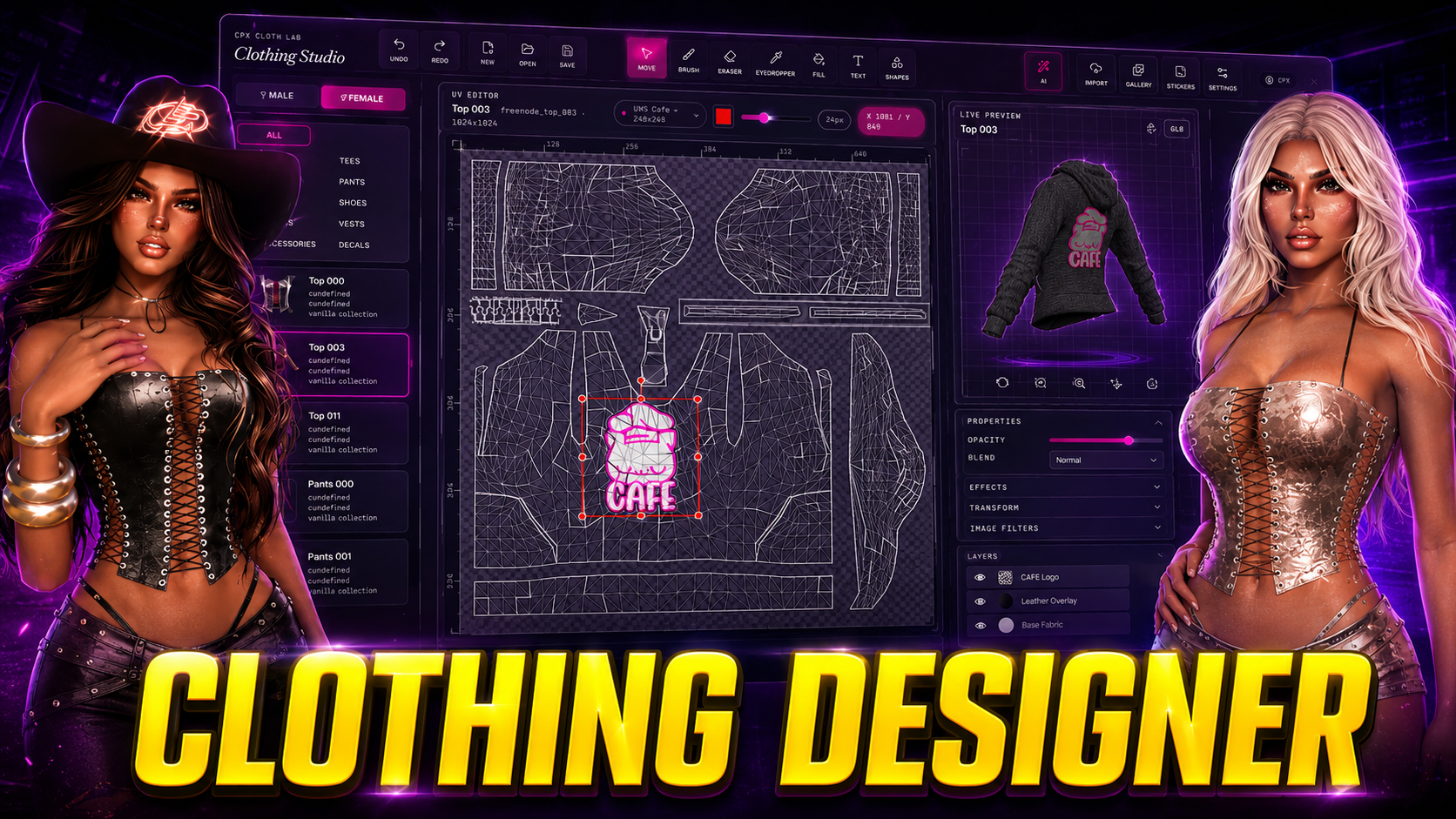
🖤 CPX Clothing Designer is a powerful in-game studio that lets players paint, type, and stamp custom textures onto vanilla GTA garments (tops, pants, shoes, masks, vests, bags) and equip them as physical inventory items. It includes a full editor with a 1024×1024 canvas and live 3D preview, a personal library for saving and sharing designs, and an optional AI Designer that generates complete outfits from a natural-language prompt. Auto-detects your framework and any of six inventory systems. This is the definitive creative toolkit for FiveM fashion.
━━━━━━━━━━━━━━━━━━━━━
⚡ MAIN FEATURES
🎨 FULL IN-GAME EDITOR (/clothstudio)
A complete design suite with a 1024×1024 canvas and a real-time 3D preview of the player's ped. Includes a full set of professional tools: brush, eraser, eyedropper, magic fill, 19 fonts, shapes, gradients, an extensive sticker gallery, a layers panel, and full undo/redo history.
👕 PERSONAL LIBRARY (/disingclo)
Each player gets a library with 30 slots to save their creations. They can browse their collection, equip any design directly onto their character, or generate a share code to send the design to another player. The library functions even if you don't use a supported inventory system.
🛍️ PRINT AS WEARABLE ITEM
Any saved design can be printed as a standard inventory item (`bcd_customwear` by default). Using the item instantly applies the custom texture to the character. Ready-to-use registration snippets for every supported inventory are in `INSTALL/items/`.
🔄 AUTO-DETECT NEW GARMENTS
Just drop `.ydd`/`.ytd` files into the `stream/` folder and restart the resource. The automatic scanner picks them up and registers them as new editable templates without any manual config edits.
📡 LIVE REPLICATION VIA STATE BAGS
Equipped custom designs instantly appear for all nearby players. Uses `AddReplaceTexture` across diffuse, normal, and spec shaders to ensure the design looks perfect in any lighting condition, within a configurable render distance.
⚙️ MULTI-FRAMEWORK & MULTI-INVENTORY
Auto-detects your server's framework (QBCore, Qbox, ESX, Standalone). Supports six inventory backends: ox_inventory (recommended), qb-inventory, qs-inventory, codem-inventory, and ESX native. A custom no-op fallback guarantees the library always works.
🔧 INTERACTIVE CONFIG & OPEN SOURCE BRIDGE
Easily generate a valid `config.lua` using our interactive configuration tool. The entire `bridge/` folder containing framework and inventory adapters is open-source, short, and fully commented, ready to be forked for your specific needs.
━━━━━━━━━━━━━━━━━━━━━
🧠 SMART SYSTEM
✅ **Auto-Framework Detection** (QBCore / QBX / ESX / Standalone)
✅ **Auto-Inventory Detection** (ox, qb, qs, codem, ESX native, custom)
✅ **Idempotent Database Install** (2 tables, `CREATE TABLE IF NOT EXISTS`)
✅ **Configurable Render Distance** & State Bag Replication
━━━━━━━━━━━━━━━━━━━━━
🛠 COMPATIBILITY
✅ QBCore
✅ ESX
✅ QBOX
✅ Standalone
━━━━━━━━━━━━━━━━━━━━━
📦 WHAT YOU RECEIVE
• **Full In-Game Editor** with Fabric.js canvas, layers, undo/redo, and 3D preview
• **Personal Library** (30 slots, share codes, browse)
• **Print-as-Item System** (`bcd_customwear`) with multi-inventory snippets
• **Automatic Garment Detection** from `stream/` folder
• **Live Multi-Player Replication** via state bags
• **Multi-Framework & Multi-Inventory** auto-detection
• **Editable Config & Locales** (EN/ES) + Open-Source Bridge
• **4-Step Installation Guide** included
━━━━━━━━━━━━━━━━━━━━━
🚀 INSTALLATION (4 STEPS)
1. **Pre-requirements**: Ensure `oxmysql` starts before this resource.
2. **Drop the resource**: Extract the folder to `resources/[standalone]/`.
3. **Register the item**: Copy the snippet from `INSTALL/items/` for your inventory.
4. **Start the server**: Add `ensure cpx-clothesdesigner` and restart. The database auto-installs.
━━━━━━━━━━━━━━━━━━━━━
💸 PRICE
$44.99
Get it now and let your players wear their imagination!
━━━━━━━━━━━━━━━━━━━━━
💬 SUPPORT
Need help?
👉 Discord:
👉 Store:
👉 Documentation: [DOCS_URL]
━━━━━━━━━━━━━━━━━━━━━
🧠 NOTE
We are constantly improving based on community feedback. Grab CPX Clothing Designer and build the most unique and creative fashion community in FiveM.
Absolutely! Most of our premium FiveM scripts are designed for broad compatibility, especially with leading frameworks like ESX (ExtendedServer) and QBCore. Specific framework requirements and compatibility details are clearly listed on each script's product page in our Tebex store. We strive to ensure seamless integration for your FiveM server.
Performance is a top priority. Our FiveM scripts are meticulously optimized to ensure minimal impact on server resources (low Resmon values and server-side ms). We focus on efficient coding practices to provide a smooth, lag-free experience for your players while delivering rich features.
Yes, we do! Each FiveM script purchase includes comprehensive documentation with clear, step-by-step installation guides. If you encounter any issues or need assistance with setup or configuration, our dedicated support team is available via Discord or our ticket system to help you get your script running smoothly.
We are committed to maintaining and improving our FiveM scripts. Updates are released regularly to introduce new features, enhance compatibility (e.g., with new FiveM builds or framework updates), and address any reported bugs. You'll typically receive update notifications and download links through your Tebex account or our community Discord.
Definitely! Our FiveM scripts are designed with flexibility in mind. Most scripts come with extensive configuration files (config.lua or similar) allowing you to easily tweak settings, change text, adjust features, and integrate them perfectly with your unique FiveM server environment without needing to alter core code.
Our premium FiveM scripts offer superior quality, ongoing dedicated support, regular updates, and robust security. Unlike many free or leaked scripts that may be outdated, buggy, or contain malicious code (backdoors), our scripts are developed professionally, ensuring stability, performance, and a safe environment for your FiveM server.
Our Tebex store features a diverse range of high-quality FiveM scripts, including immersive job systems, engaging player activities, advanced UI enhancements, utility scripts, administrative tools, and much more. We aim to provide unique and innovative scripts to elevate the roleplaying experience on any FiveM server. Browse our categories to find the perfect script for you!
