Script Details
👀 VIDEO HERE 👀
📣 Business Announcements • Admin Editor • 200 Visual Structures • GPS Routing
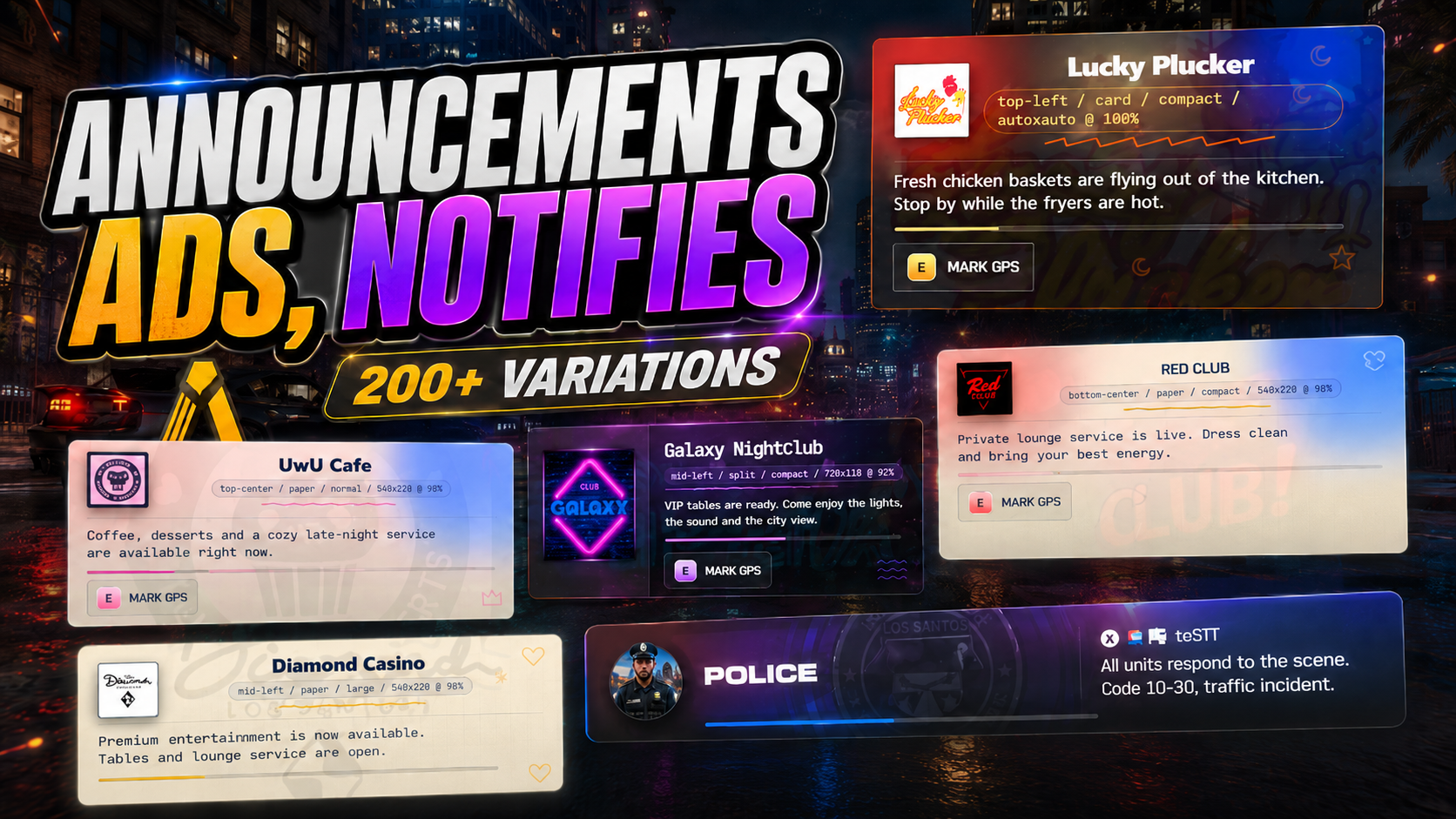
🖤 CPX Business Announcements is a premium announcement system for FiveM that gives every business and job on your server a polished, professional voice. Staff open the in-game admin editor, pick a job, capture a location, choose from five visual layouts, customize colors and fonts, add sounds and effects, and save a reusable command template. Players use that command, optionally add a custom message, and a beautiful branded announcement appears for the whole server — complete with GPS routing so customers can press E and navigate straight to the door.
Works with restaurants, bars, mechanics, emergency services, and any job you can imagine. Fully compatible with QBCore, Qbox, ESX, and Standalone. Optional sync with CPX PauseMenu.
━━━━━━━━━━━━━━━━━━━━━
⚡ MAIN FEATURES
🛠️ IN-GAME ADMIN EDITOR
Open `/announcementsadmin` and access the full visual editor. Create announcement profiles, pick a job, capture a GPS location, choose a structure, tune colors, set fonts, add sounds and effects, and preview everything live while editing. No config files, no restarts.
📢 CUSTOM COMMAND TEMPLATES
Each business gets its own reusable command (e.g., `/a [message]`). Staff configure it once, and players use it to send announcements with the correct branding every time. Supports optional custom messages appended to the announcement.
🎨 FIVE ANNOUNCEMENT STRUCTURES
Choose from five distinct layouts: card, paper, horizontal banner, split, and compact. Each structure supports visual styles, decorations, emergency effects, sounds, themes, color palettes, font selection, and canvas sizing. Every business gets a unique look.
📍 GPS ROUTING WITH E WAYPOINT
Enable GPS on any announcement. Players see the prompt, press E, and the location is marked on their map. Perfect for promoting events, openings, daily specials, or directing customers to your business.
🔄 OPTIONAL PAUSEMENU SYNC
If CPX PauseMenu is installed on the server, sending an announcement also triggers the business-open event. The integration is automatic — no files are edited, no compatibility patches needed.
🌐 MULTI-JOB SUPPORT
Pre-configured presets for restaurants, bars, mechanics, and emergency services. Fully customizable for any other job or business type on your server.
⚙️ AUTO-INSTALL DATABASE
One database table (`cpx_announcements_businesses`) is created automatically on first boot using `CREATE TABLE IF NOT EXISTS`. New release columns are migrated automatically. Set `Config.AutoInstallDatabase = false` to import `database.sql` manually.
━━━━━━━━━━━━━━━━━━━━━
🧠 SMART SYSTEM
✅ Auto-Database Installation (idempotent, auto-migrates columns)
✅ Custom Command Templates (one per business, configurable)
✅ Live Admin Preview (edit and see changes before saving)
✅ GPS Routing with E Waypoint Support
✅ Optional PauseMenu Sync (no file edits)
✅ EN/ES Localization (ready for more languages)
━━━━━━━━━━━━━━━━━━━━━
🛠 COMPATIBILITY
✅ QBCore
✅ ESX
✅ QBOX
✅ Standalone
━━━━━━━━━━━━━━━━━━━━━
📦 WHAT YOU RECEIVE
• Full in-game admin editor for announcement profiles
• Five visual announcement structures with full styling options
• Custom command templates per business
• GPS routing with E waypoint functionality
• Optional CPX PauseMenu sync
• Auto-install database (one table)
• Configurable cooldowns, defaults, admin groups, and presets
• Editable config.lua and locale files (EN/ES)
• Full install guide included
━━━━━━━━━━━━━━━━━━━━━
🚀 INSTALLATION (3 STEPS)
1. Copy `cpx-announcements` into your resources folder.
2. Ensure `oxmysql` starts before it in `server.cfg`.
3. Add `ensure cpx-announcements` and restart. Database installs automatically.
Open `/announcementsadmin` and create your first announcement profile in seconds.
━━━━━━━━━━━━━━━━━━━━━
💸 PRICE
$ 19.99
Get it now and give your businesses the professional voice they deserve!
━━━━━━━━━━━━━━━━━━━━━
💬 SUPPORT
Need help?
👉 Discord: https://discord.gg/kpDFZ4eEfk
👉 Store: https://complex-studios-store.tebex.io/
👉 Documentation: https://docs-complexstudios.vercel.app/
━━━━━━━━━━━━━━━━━━━━━
🧠 NOTE
We are constantly improving based on community feedback. Grab CPX Business Announcements and make your server's businesses stand out.
Absolutely! Most of our premium FiveM scripts are designed for broad compatibility, especially with leading frameworks like ESX (ExtendedServer) and QBCore. Specific framework requirements and compatibility details are clearly listed on each script's product page in our Tebex store. We strive to ensure seamless integration for your FiveM server.
Performance is a top priority. Our FiveM scripts are meticulously optimized to ensure minimal impact on server resources (low Resmon values and server-side ms). We focus on efficient coding practices to provide a smooth, lag-free experience for your players while delivering rich features.
Yes, we do! Each FiveM script purchase includes comprehensive documentation with clear, step-by-step installation guides. If you encounter any issues or need assistance with setup or configuration, our dedicated support team is available via Discord or our ticket system to help you get your script running smoothly.
We are committed to maintaining and improving our FiveM scripts. Updates are released regularly to introduce new features, enhance compatibility (e.g., with new FiveM builds or framework updates), and address any reported bugs. You'll typically receive update notifications and download links through your Tebex account or our community Discord.
Definitely! Our FiveM scripts are designed with flexibility in mind. Most scripts come with extensive configuration files (config.lua or similar) allowing you to easily tweak settings, change text, adjust features, and integrate them perfectly with your unique FiveM server environment without needing to alter core code.
Our premium FiveM scripts offer superior quality, ongoing dedicated support, regular updates, and robust security. Unlike many free or leaked scripts that may be outdated, buggy, or contain malicious code (backdoors), our scripts are developed professionally, ensuring stability, performance, and a safe environment for your FiveM server.
Our Tebex store features a diverse range of high-quality FiveM scripts, including immersive job systems, engaging player activities, advanced UI enhancements, utility scripts, administrative tools, and much more. We aim to provide unique and innovative scripts to elevate the roleplaying experience on any FiveM server. Browse our categories to find the perfect script for you!
